Testing Documentation
This page outlines the testing strategies, tools, and processes used in the Dorm Chores Scheduler project to ensure reliability, code quality, and a consistent user experience.
Automated Testing (Jest)
We use Jest with ts-jest for unit and integration testing of our business logic and utility functions.
How to Run Tests
You can run the automated tests using the following commands from the root directory:
- Run all tests:
bash npm test - Run tests in watch mode:
bash
  npm run test:watch
Test Results
Below is a typical output from running the full test suite:
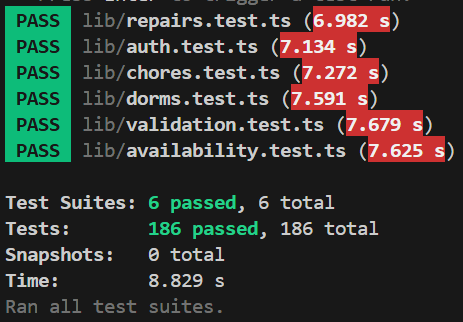
Note: As of the latest build, all 186 automated tests are passing.
Detailed Test Suites Breakdown
The automated tests are located in the lib/ directory. Each file targets a specific domain of the application's business logic:
| Test Suite | Detailed Description |
|---|---|
auth.test.ts |
Authentication & Profiles: Validates sign-in, sign-up, and sign-out flows. It checks user role retrieval (student vs manager) and ensures profile updates (like display names) follow strict validation rules. |
availability.test.ts |
User Availability: Verifies how student availability status is retrieved and updated. It tests the integration between the Supabase database and local AsyncStorage caching to ensure the app works reliably offline or with poor connectivity. |
chores.test.ts |
Chore Management: Covers the entire lifecycle of a chore including creation, auto-assignment logic, status transitions (pending to completed), and deletion. It also enforces limits, such as the 500-chore cap per dorm. |
dorms.test.ts |
Dormitory Logic: Validates dorm creation, membership limits, and student joining/leaving processes. It also tests complex manager features like ownership transfer and linking dorms via QR codes or manual connect codes. |
repairs.test.ts |
Repair Requests: Ensures repair requests are correctly submitted with all mandatory fields (location, urgency, etc.). It tracks status transitions from pending to resolved and verifies that users can see requests they reported. |
validation.test.ts |
Security & Data Integrity: A critical suite that tests all input validation. It includes extensive SQL Injection protection tests, email format verification, and strict password policy enforcement (uppercase, symbols, etc.). |
Manual UI Testing (Expo Router)
For visual verification of components and layouts, we use a dedicated set of UI test pages built directly into the application's routing system.
How to Access UI Tests
- Start the development server:
npx expo start - Open the app on a device or emulator.
- Navigate to the
/ui-testsroute. - Select a component from the list to view its interactive test page.
Available UI Test Pages
Located in app/ui-tests/, these pages allow developers to verify the look and feel of components in isolation:
- Buttons:
button-test.tsx,block-button-test.tsx - Inputs:
input-test.tsx,selector-test.tsx - Feedback:
inline-notification-test.tsx,info-panel-test.tsx,availability-badge-test.tsx - Navigation/Layout:
navbar-test.tsx,curved-banner-test.tsx - Cards/Lists:
list-item-test.tsx,profile-picture-test.tsx
Code Quality & Static Analysis
In addition to functional tests, we use several tools to maintain high code standards.
Linting & Formatting
- ESLint: Run
npm run lintto check for code quality issues and potential bugs. - Prettier: Run
npm run formatto check if the code follows our formatting rules. - Fixing: Use
npm run lint:fixandnpm run format:fixto automatically resolve most issues.
Type Checking
We use TypeScript to ensure type safety across the codebase.
- Run typecheck:
npm run typecheck
Project Health
- Expo Doctor: Run
npm run doctorto check the health of the Expo project, dependencies, and configuration.
Continuous Integration (CI)
Every Pull Request and push to the main branch triggers a GitHub Actions workflow that runs the following checks:
- Dependency Audit:
npm ci - Linting:
npm run lint - Formatting:
npm run format - Type Checking:
npm run typecheck - Project Health:
npm run doctor
Note: All automated checks must pass before a Pull Request can be merged. While npm test is not currently part of the CI pipeline, contributors are expected to run it locally before submitting changes.